Best PPF CRM Software for Installers in 2026
Running a PPF business involves more than installing Paint Protection Film. You need to capture enquiries, follow up with potential customers, create quotes, schedule installations, manage customer records and send invoices.
The right PPF CRM software brings these workflows together so you can manage your business without relying on spreadsheets, scattered WhatsApp conversations and manual follow-ups.
In this guide, we'll look at the features PPF installers should consider when choosing a CRM and explain how Bizely helps manage the customer journey from enquiry through booking, installation and invoicing.
Quick Summary
- Best overall PPF CRM: Bizely
- Best for growing PPF businesses: A CRM that combines lead management, scheduling, quotes and invoicing
- Key features to look for: Lead management, customer records, appointment scheduling, quotes and invoicing
- Best way to evaluate a CRM: Choose software that fits your PPF workflow rather than a generic system with unnecessary complexity
Common challenges PPF installers face
Common challenges include:
- Losing leads in WhatsApp conversations
- Creating quotes manually
- Forgetting to follow up with potential customers
- Double-booking installation appointments
- Tracking multiple customer and vehicle records
- Finding customer information when they return
- Creating and tracking invoices manually
A CRM brings this information into one organised system, making it easier to keep track of customers and follow-ups while reducing administrative work.
What Is a CRM for PPF Installers?
Depending on the software, a PPF CRM can help you:
- Capture new customer enquiries
- Track leads and follow-ups
- Schedule PPF installation appointments
- Create professional quotes
- Manage customer records and history
- Generate invoices
- Track the progress of customer bookings
For busy PPF shops, keeping these workflows organised can reduce administrative work and make it easier to manage every customer.
What Should a PPF CRM Include?
A general-purpose CRM can store customer information and track sales, but PPF installers need software that also fits their day-to-day service workflow.
When evaluating CRM software for a PPF business, look for features that help you manage:
- Customer enquiries and lead management
- Customer records
- Installation appointments
- Quotes and estimates
- Technician assignments
- Customer and vehicle information
- Invoices and payment status
The goal isn't simply to find a CRM that stores contacts. The right software should make the entire process of turning an enquiry into a booked and completed PPF job easier to manage.
Key Features Every PPF CRM Should Include
Lead Management: Keep Every PPF Enquiry Organized
Every PPF installation starts with an enquiry, whether it comes through your website, social media, phone or another channel.
A good PPF CRM should keep enquiries organised so you can track each potential customer and know which leads need attention.
Look for features such as:
- Lead status tracking
- Customer and enquiry notes
- Follow-up tracking
- Customer contact information
- Enquiry history
Instead of searching through conversations and spreadsheets, your team can see where each enquiry stands and what needs to happen next.
Learn more about Lead ManagementCustomer Management: Keep Customer and Vehicle Information Together
PPF customers may return for additional services, another vehicle or future maintenance. Keeping their information organised makes those interactions easier to manage.
A PPF CRM should let you keep information such as:
- Customer contact information
- Vehicle details
- Previous services
- Quotes and invoices
- Notes
- Booking history
Having customer information in one place makes it easier to understand previous interactions and provide a consistent customer experience.
Learn more about Customer Management.
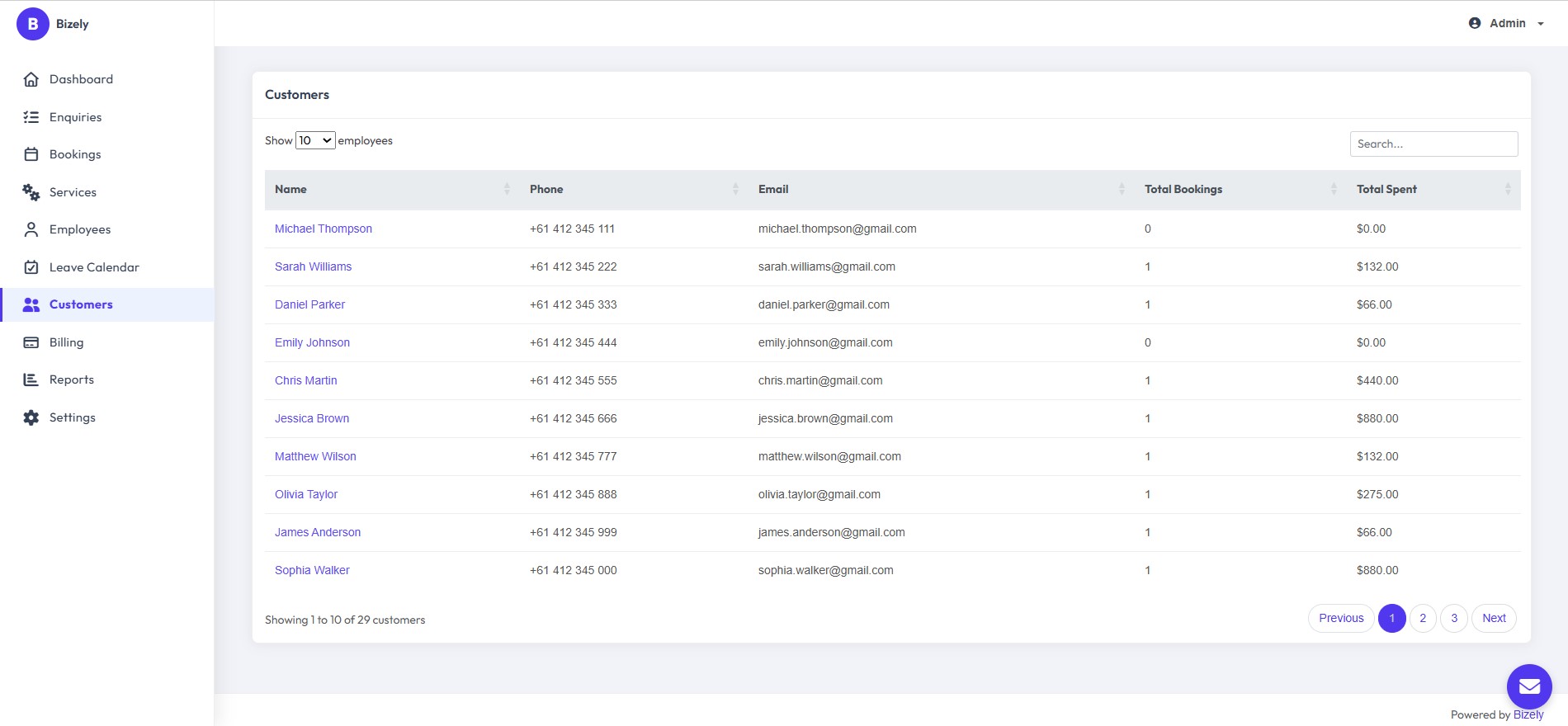
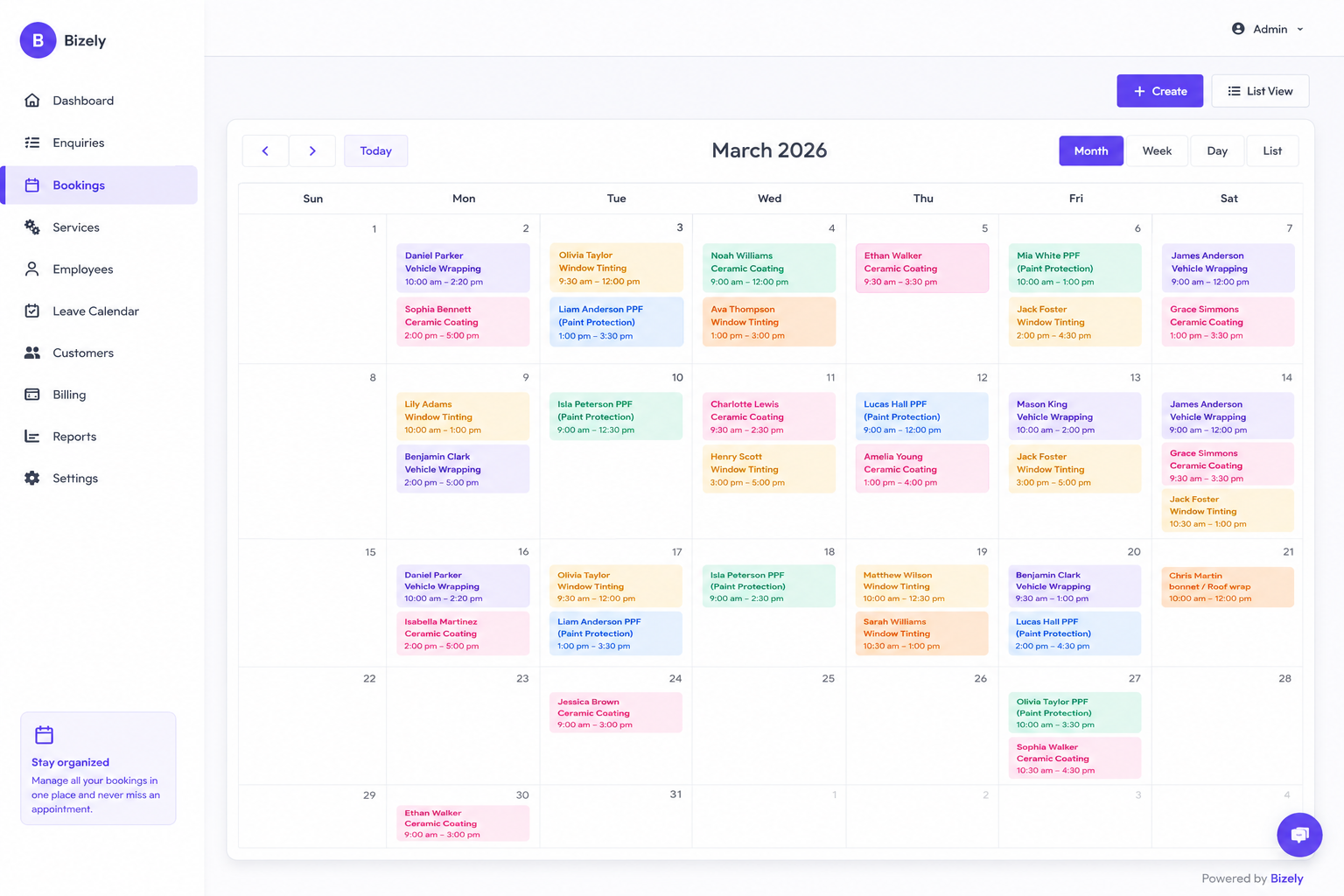
PPF Appointment Scheduling: Keep Installations Organized
PPF installations need to be scheduled around available technicians, workshop capacity and customer availability. A clear calendar helps keep upcoming work organised.
Useful scheduling features include:
- Daily and weekly calendar views
- Technician assignment
- Appointment reminders
- Schedule management
- Rescheduling
With your appointments organised in one calendar, it becomes easier to see upcoming PPF installations and manage your team's schedule.
Learn more about Appointment Scheduling.
PPF Quotes and Estimates: Create Professional Quotes
PPF jobs often involve different protection packages, vehicle sizes and service options. A CRM with quoting tools can make it easier to prepare professional estimates for customers.
Useful quoting features include:
- Service pricing
- Taxes and discounts
- Quote details and notes
- Quote status tracking
- Conversion from quote to booking
Professional quotes also give customers a clear understanding of the services and pricing before they commit to an installation.
Learn more about Quotes and Estimates.
Technician Scheduling and Job Assignment
As a PPF business grows, managing multiple technicians and installations becomes more difficult. Your CRM should make it easy to see who is assigned to each booking.
Useful capabilities include:
- Assigning bookings to technicians
- Viewing upcoming assigned jobs
- Managing technician schedules
- Keeping bookings organised by employee
Clear job assignments help your team know which installations they are responsible for and reduce confusion around upcoming bookings.
Automated Customer Notifications
Keeping customers informed throughout the booking process can create a more professional experience and reduce unnecessary back-and-forth.
When evaluating a PPF CRM, look for notification capabilities that can support important stages of the customer journey, such as bookings, appointments, quotes and invoices.
Common notifications include:
- Booking confirmations
- Appointment reminders
- Quote notifications
- Job completion updates
- Invoice notifications
Automated communication creates a more professional customer experience and reduces missed appointments.
Customer & Vehicle History
Returning customers shouldn't have to explain their history every time they contact your business. A CRM should make previous customer and booking information easy to access.
Useful records include:
- Customer information
- Vehicle details
- Previous bookings
- Quotes
- Invoices
- Notes
Having this information available in one place makes it easier to understand previous interactions and provide better service to returning customers.
PPF Invoicing & Payment Tracking
Once an installation is completed, you need a simple way to create invoices and keep track of what customers have paid.
A PPF CRM with invoicing should help you:
- Create professional invoices
- Calculate taxes where required
- Track payment status
- Monitor outstanding balances
- Keep invoice records with customer information
Keeping invoicing connected to your customer records reduces duplicate data entry and makes it easier to keep financial information organised.
Learn more about Invoicing
Lead Follow-Ups: Keep Potential Customers Moving
Not every PPF customer books immediately after receiving a quote. A follow-up process helps you stay organised and gives potential customers an opportunity to ask questions or move forward.
A CRM can help you keep track of:
- Customers who haven't responded to a quote
- Upcoming appointments
- Leads that need attention
- Previous customer interactions
Consistent follow-up makes it easier to manage your sales pipeline without relying on memory or scattered conversations.
Business Overview
A useful CRM should give business owners a clear view of upcoming work and important activity without having to piece information together from different systems.
Look for a dashboard that helps you quickly understand your bookings, enquiries and day-to-day business activity.
How Bizely Manages a PPF Job From Lead to Invoice
A PPF job involves several steps, from capturing the initial enquiry and preparing a quote to scheduling the installation and creating the final invoice.
Bizely connects these steps so customer, vehicle, quote, booking and invoice information can be managed from one place instead of being spread across WhatsApp, spreadsheets, calendars and paper notes.
Capture the PPF Lead
Every PPF job starts with a customer enquiry. Whether someone contacts you through your website, phone, social media or walks into your shop, the enquiry needs to be captured and organised.
Bizely lets you keep important customer and vehicle information together, including:
- Customer name and contact details
- Vehicle year, make and model
- Registration number
- Requested service
- Notes and requirements
This gives your team a clear record of the enquiry and makes it easier to follow up when the customer is ready to move forward.
Create a Professional PPF Quote
Once you've understood the customer's requirements, you can create a professional quote for the requested PPF services.
Depending on the job, a quote can include:
- PPF services and packages
- Additional services
- Taxes and discounts
- Terms and notes
Keeping the quote connected to the customer's enquiry means you don't have to recreate the customer's information every time you move to the next stage of the process.
Convert the enquiry into a Booking
When the customer approves the quote, you can move the enquiry into a booking without manually entering all of the customer information again.
This keeps the customer, vehicle, services and booking information connected throughout the workflow.
Schedule the PPF Installation
Once the booking is confirmed, schedule the installation and assign the job to the appropriate technician.
Bizely gives you a central calendar for managing upcoming bookings and technician assignments, making it easier to keep your installation schedule organised.
- Schedule installation appointments
- Assign bookings to technicians
- View upcoming jobs
- Keep your installation calendar organised
Complete the PPF Installation
When the customer arrives for the installation, your team can access the booking and the customer information associated with the job.
This keeps important information such as the customer, vehicle, selected services and booking details together instead of requiring your team to search through different systems.
Generate the Invoice
After the PPF installation is completed, create the invoice using the customer and service information already associated with the job.
Depending on your invoicing setup, you can include:
- Completed services
- Taxes
- Discounts
- Payment status
Keeping invoices connected to customer records makes it easier to keep your financial records organised and reduces duplicate data entry.
Learn more about Bizely Invoicing.
Continue the Customer Relationship
The relationship with a customer doesn't necessarily end when the PPF installation is completed. Keeping their customer and booking history organised makes future interactions easier to manage.
When the customer returns for another service, your team can refer back to their previous information instead of starting from scratch.
This can also make it easier to introduce other services your business offers, such as window tint, ceramic coating or vehicle wraps.
Benefits of Using a PPF CRM
The right CRM can help PPF installers organise their day-to-day operations and spend less time managing administrative tasks.
- Spend less time on administrative work
- Keep appointments and schedules organised
- Respond to customer enquiries more consistently
- Keep customer and vehicle records organised
- Manage enquiries, quotes, bookings and invoices from one place
- Provide a more professional customer experience
- Keep customer history available for future visits
- Manage growing enquiry and booking volume more efficiently
How to Choose the Best CRM for PPF Installers
The best CRM for your PPF business depends on how you manage enquiries, quotes, installations and customers. Before choosing software, consider whether it supports the workflow your business actually follows.
Ask the following questions when comparing PPF CRM software:
- Can it manage customer enquiries? Look for a clear way to capture and track leads from enquiry through booking.
- Can I create professional quotes? Quoting should be simple enough to prepare estimates without rebuilding customer information manually.
- Does it include appointment scheduling? Your CRM should make it easy to organise PPF installation appointments and assign jobs to your team.
- Does it support invoicing? Connecting invoices with customer and booking information can reduce duplicate data entry.
- Can I manage technicians? If you have multiple installers, check whether you can assign bookings and keep track of upcoming jobs.
- Can I access customer and vehicle history? Returning customers should be easy to identify and their previous information should be accessible.
- Is it easy to use? A CRM only helps if your team actually uses it. Avoid unnecessary complexity that makes everyday tasks harder.
- Does it work across the devices your team uses? Check whether the software works well on the desktop and mobile devices your business relies on.
For PPF installers, the best CRM isn't necessarily the one with the longest feature list. It's the one that fits your workflow and makes everyday tasks easier to manage.
Why Bizely Is a Good CRM for PPF Installers
Bizely is built for automotive service businesses that manage customer enquiries, bookings, quotes, installations and invoicing as part of their daily workflow.
It supports businesses offering:
Rather than requiring an automotive business to piece together different tools for leads, appointments, quotes and invoices, Bizely brings these workflows into one platform.
With Bizely, PPF installers can:
- Capture and manage customer enquiries
- Track leads and follow-ups
- Schedule PPF installation appointments
- Assign bookings to technicians
- Create quotations
- Generate invoices
- Keep customer and booking history organised
If you're looking for a CRM specifically suited to an automotive service workflow, you can learn more about Bizely's PPF CRM software.
Frequently Asked Questions
What is the best CRM for PPF installers?
The best CRM for a PPF installer is one that fits the way the business manages enquiries, quotes, appointments, customer records and invoices. Bizely is designed for automotive service businesses and brings these workflows together in one platform.
Why do PPF businesses need CRM software?
PPF businesses often manage enquiries, quotes, appointments, customer information and invoices across different tools. A CRM brings these workflows together so installers can keep customer information organised, track leads and manage bookings from one place.
Can a CRM help PPF installers manage more leads?
Yes. A CRM can help PPF installers keep enquiries organised, track follow-ups and see which potential customers still need attention. This can make it easier to manage a growing number of enquiries without relying on spreadsheets or scattered conversations.
Does Bizely's PPF CRM include invoicing?
Yes. Bizely includes invoicing alongside customer management, bookings and quotations, allowing PPF businesses to keep their customer and transaction information organised in one platform.
Is CRM software suitable for small PPF shops?
Yes. A CRM can be useful even for a small PPF business because it provides one place to manage enquiries, customers, appointments, quotes and invoices. As the business grows, having an organised workflow can also make it easier to manage increasing enquiry and booking volume.
What should I look for in PPF CRM software?
Look for software that can manage PPF enquiries, lead follow-ups, customer and vehicle information, quotations, installation appointments, technician assignments and invoicing. The software should also be simple enough for your team to use consistently.
Final Thoughts
Choosing the right CRM can make it easier for PPF installers to organise enquiries, quotes, appointments, customer records and invoices in one place.
The best PPF CRM isn't necessarily the software with the longest feature list. It is the system that fits your workflow, is easy for your team to use and helps you manage the customer journey from enquiry through completed installation.
If you're looking for CRM software built for automotive service businesses, explore Bizely's PPF CRM software to see how it can help you manage your PPF business.

Ready to simplify your PPF business?
Manage PPF leads, quotes, appointments, customers and invoices in one place. Start your free 30-day trial with Bizely and see how easy it is to manage customers, bookings, quotes, and employees-all from one place.
Request Early AccessCurrently onboarding our first 20 automotive businesses.
No setup fee • Cancel anytime